
When it comes to WordPress website maintenance, ensuring a good user experience is critical. Behind the scenes, one of the most powerful tools we have to maintain your WordPress website’s health is PHP error logging. At Inspry, we’ve recently implemented active PHP error logging across all maintenance sites , allowing us to catch and address issues immediately. This helps keep your site running smoothly, protects your reputation, and ensures your visitors have a frustration-free experience.
What Is PHP Error Logging?
PHP is the scripting language that powers the majority of WordPress websites. It handles everything from loading content dynamically to executing custom plugins and themes. Like any programming language, PHP can encounter errors during execution, such as:
- Syntax Errors: Mistakes in the code structure, such as missing semicolons or brackets.
- Warnings: Non-fatal issues, like using a deprecated function or calling an undefined variable.
- Notices: Informational messages about potential issues, such as undefined variables.
- Fatal Errors: Critical issues that stop PHP scripts from running entirely, like calling a function that doesn’t exist.
PHP error logging is the process of capturing these errors and storing them in a log file. This log provides developers with a detailed record of when errors occurred, what caused them, and where they happened in the codebase.
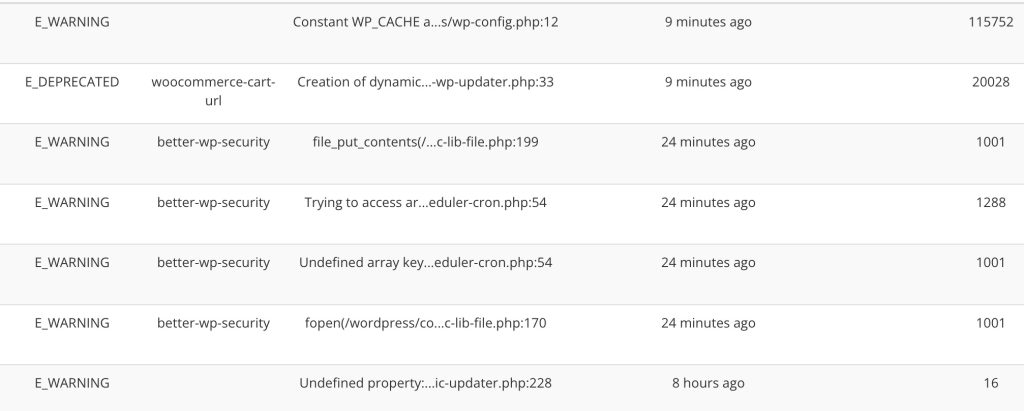
Why PHP Error Logging Is Essential for WordPress Websites
- Proactive Problem Detection: Without error logging, many PHP issues might go unnoticed until they start causing visible problems, such as broken functionality or a full site crash. By logging fatal errors, we can detect these problems early, often before they impact your site visitors.
- Faster Debugging: Error logs provide detailed information about the root cause of an issue, such as the file and line number where the error occurred. By actively logging PHP errors, we can get the details right away and don’t have to wait for the errors to happen again. This saves time during troubleshooting, allowing developers to resolve problems more efficiently.
- Improved Performance: Some errors, such as repeated warnings or notices, can clutter your website’s server logs and consume resources. By identifying and resolving these errors, we can optimize your website’s performance.
- Enhanced Security: Error logs can help identify vulnerabilities in your site, such as deprecated or insecure PHP functions. Addressing these issues promptly reduces the risk of your site being exploited by hackers.
- Preventing Downtime: Catching and fixing errors early reduces the likelihood of downtime, ensuring your site remains accessible to users and maintains its credibility.
Active PHP Error Logging for Maintenance Clients
At Inspry, we understand that prevention is better than cure. That’s why we’ve implemented active PHP error logging across all websites on our managed WordPress maintenance plans. Here’s how it works and why it’s a game-changer:
- Real-Time Error Monitoring: We’ve set up active logging mechanisms that monitor your website for PHP fatal errors in real-time. This allows us to catch issues as soon as they occur, rather than waiting for them to escalate into larger problems.
- Centralized Logging: Instead of relying on default error logs stored on your web server, we centralize error logs in a secure, remote accessible location. This ensures we have full visibility into your site’s PHP activity at all times.
- Root Cause Analysis: Error logs provide us with precise information about the cause of an issue. For example, if a plugin update introduces a deprecated function, the error log will point us directly to the problem, saving time and ensuring accurate fixes.
- Continuous Improvement: By analyzing trends in error logs, we can identify patterns and implement long-term improvements to your site’s codebase. This reduces the likelihood of recurring issues and ensures your site remains stable and efficient.
Common PHP Errors We Catch with Logging
Active PHP error logging helps us detect a variety of issues, including:
- Plugin Conflicts: When two plugins attempt to modify the same functionality, it can result in fatal errors or warnings.
- Theme Issues: Custom or outdated themes may use deprecated PHP functions that trigger errors.
- Server Configuration Problems: Misconfigured server settings, such as memory limits, can cause PHP errors that we can quickly diagnose and resolve.
- Deprecated Functions: PHP versions evolve over time, and using functions that are no longer supported can lead to issues. Error logging identifies these cases so we can update your code.
- Database Errors: Issues like missing tables or improperly structured queries often appear as PHP errors and can be addressed before causing significant damage.
Advantages of Active PHP Error Logging for Maintenance Clients
By implementing active PHP error logging across all maintenance sites, we provide several key benefits to our clients:
- Minimized Downtime: Real-time error detection allows us to resolve issues quickly, ensuring your site remains online and accessible to users.
- Peace of Mind: You can rest easy knowing we’re monitoring your site around the clock for potential issues.
- Improved Site Performance: Regularly addressing PHP warnings and notices ensures your site operates at peak performance.
- Faster Support: When issues do arise, our developers have immediate access to detailed error logs, enabling faster and more accurate troubleshooting.
- Future-Proof Code: By addressing deprecated functions and other warnings, we ensure your site’s code is compatible with the latest PHP versions, reducing the risk of future issues.
How You Can Benefit from a WordPress Maintenance Plan
If you’re not already on one of our WordPress support plans, now is the perfect time to consider joining. Our plans include:
- Regular WordPress core, theme, and plugin updates.
- Proactive PHP error logging and monitoring.
- Performance optimization and uptime monitoring.
- Security measures to protect your site from malware and hackers.
By partnering with Inspry, you’re not just getting website maintenance, you’re getting peace of mind that your site is in expert hands.
If you’d like to learn more about how our maintenance plans and active error logging can benefit your site, feel free to contact us. We’d be happy to help keep your website running at its best!